Every FRSecure client and prospect is getting the same pitch: an AI pen test that beats a human tester, for half the price. On Episode 6 of the Truth in Cyber podcast, Oscar Minks and Michael Kennedy asked Seth Bowling, R&D manager at FRSecure, to check that claim.
Seth’s team has spent most of this year testing about a dozen automated and “AI-enabled” pen testing tools. They ranged from free open source tools to expensive commercial products, and the team compared every one against real pen tests done by people. The tools came up well short.
Where’s the AI?
The biggest surprise: most of these tools barely use AI to run the test. Under the hood, it’s old-school automation, basically a long chain of if-then rules. The AI gets added at the end to write up the findings. That’s backwards, because judging what a finding means for your business is the one thing people still do better than AI.
AI is great at reading code and spotting flaws. It’s much weaker at the moment-to-moment judgment calls a real attack takes. The cutting-edge AI models that can do more are far too expensive to run for the $3,000 to $4,000 these vendors charge for a pen test.
“If you’re doing one pen test a year, your only pen test for the year should not be through an automated or AI product, period.”
Seth Bowling, FRSecure
Spend smarter
On a tight budget? Seth’s advice is to buy a good vulnerability scanner before an automated pen test. Many of these tools rely on free open source scanners that can’t match the established commercial ones.
Automated tools still have a place. Run them weekly to keep checking your defenses, then bring in human testers a couple of times a year.
Ask before you buy
Shopping anyway? Have the vendor run a demo on your own systems, and compare the results to your last pen test. Then ask two questions: what is the AI actually doing, and where does your data go during and after the test?
Seth expects truly AI-driven testing to improve fast. For now, it’s a supplement, not a replacement.
https://truthincyber.org/wp-content/uploads/2026/02/truth-in-cyber-podcast-logo.jpg480480Melhttps://truthincyber.org/wp-content/uploads/2025/09/Truth-In-Cyber-logo-thin.pngMel2026-10-17 07:14:282026-10-17 07:14:28Your AI Pen Test Might Just Be an If-Then Statement
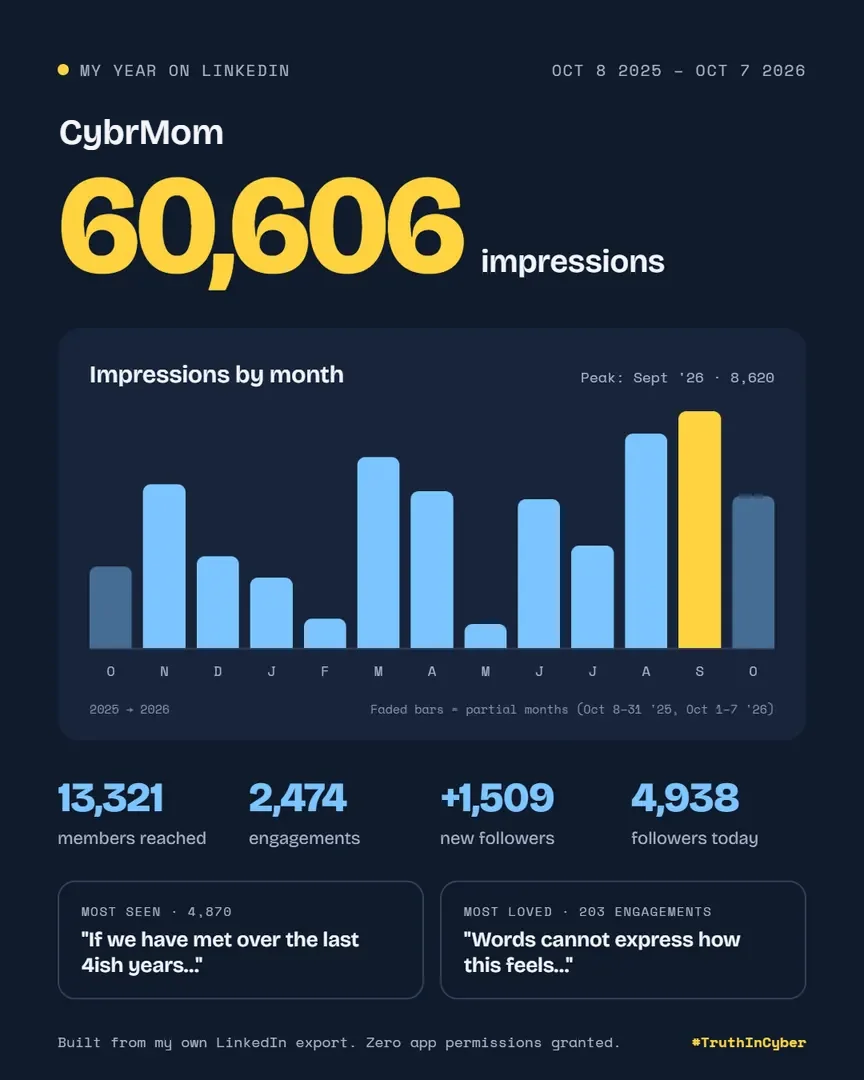
There’s a new trend all over LinkedIn: “LinkedIn Wrapped.” It’s a tidy, shareable card, created by an AI Marketing company, showing your impressions, follower growth, and top posts from the past year.
People say it helped them understand their reach. Fine. Let’s assume it’s not about ego and you really want to get better at your craft. Then I have three questions:
What are you actually doing with that data?
How is it different from what LinkedIn already gives you?
What did you give up to get it?
What are you doing with it?
I asked several people who shared their results: “How are you using this data, or how do you plan to?”
The answers were solid:
“Story posts perform better than everything else. I’m writing more of those.”
“I didn’t even post once a week last year. I need to double my output.”
“I changed roles. My old posts don’t reflect where I am now.”
“I want to build my brand, not the logo in my email signature.”
Those are real goals, and good ones. But look at what they share: none of them needed a third-party app. Your best-performing posts are already in LinkedIn’s analytics. Your posting frequency is in your activity feed. And you knew your old content didn’t fit your new role before you clicked anything.
How is it different from LinkedIn’s own analytics?
Spoiler: it isn’t.
Click “Post impressions” on your profile. LinkedIn already shows you the same numbers and more. You can switch the date range to the last week, month, quarter, or year. You can see your top posts, your follower growth, and your audience demographics: job titles, industries, and locations of the people you’re actually reaching.
Want it to look like the Wrapped card? Hit Export, download the spreadsheet, and give it to your AI assistant. I used Claude. I got the same result, and no new app got access to my account.
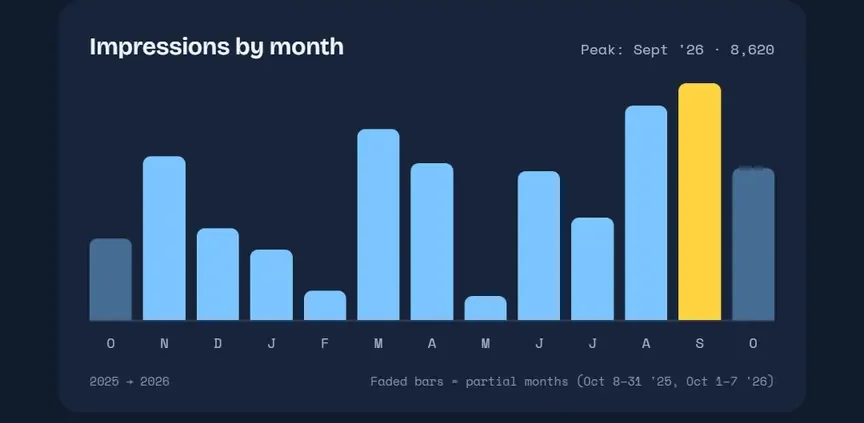
Built from my own LinkedIn export and Claude. Zero app permissions granted.
There’s one thing Wrapped adds: a ranking like “top 5% of creators.” Ask yourself where that benchmark comes from. It comes from everyone else who connected their account. When the product is free, your data is the price.
What did you give up?
I’ll admit it. I saw the neatly packaged stats, got curious, and clicked.
Then I hit the permissions screen. Thirteen bullet points stood between me and my fun little post.
Some were standard. Use my name and photo? Sure, it’s building a card with my face on it. Read my follower data? Makes sense.
Manage your organization’s pages and retrieve reporting data. I paused. I’m an admin on 16 company pages, and I wasn’t about to give a “Wrapped” generator the keys to any of them.
Create, modify, and delete posts, comments, and reactions on your behalf.Full stop. Create, fine, it’s making a post. But modify and delete? A year-in-review card has no reason to edit or erase what I’ve said in public. And that request was tucked between two harmless “retrieve information” bullets.
Create, modify, and delete comments and reactions on your organization’s posts. Nope.
And the one that made me write this:
Use the primary email address associated with your LinkedIn account.
Read that again. For a trendy year-in-review card, people handed a third-party app their primary email address. Plenty of people signed up for LinkedIn with their work email. They just exposed their company to a vendor the security team has never heard of. I got all the way to that screen on my work device. Nothing stopped me.
So what’s the actual risk?
It’s not a one-time thing. You didn’t share a password. You granted an OAuth token. It doesn’t need your password, MFA doesn’t block it, and changing your password usually doesn’t revoke it. It stays active until you remove it, and most people never do.
Your account becomes someone else’s megaphone. If that app, or anyone who breaches it, gets your token, they can post, edit, and delete as you. If you approved the org permissions, they can do the same as your company. Think phishing links posted from a trusted executive’s account, or a brand page pushing scams. Stealing app access tokens is a well-known attacker technique (MITRE ATT&CK T1528) because it skips the login entirely.
Your work email lands in someone else’s database. That means marketing lists, data brokers, and breach dumps. Paired with your name, title, and employer, it gives an attacker everything needed for a convincing phishing email.
It’s shadow IT. Your security team vets vendors. You skipped that step. No contract, no review, and no idea where your data lives or who can see it.
The trend teaches bad habits. Every viral “connect your account” gimmick makes clicking “Allow” feel normal. Attackers count on that. Consent phishing, where fake apps request real permissions, works because people have learned to approve without reading.
Fix it now: Go to LinkedIn → Settings → Data privacy → Permitted services and remove anything you don’t use. Then tell your security team what you connected to. They’d much rather hear it from you than find it themselves.
We all preach “read the fine print” and “don’t click shit.” Then a shiny trend shows up and we click anyway.
Your stats were always free. Your access never was.
https://truthincyber.org/wp-content/uploads/2026/10/tic-linkedin-wrapped-cybrmom.webp1080864Melhttps://truthincyber.org/wp-content/uploads/2025/09/Truth-In-Cyber-logo-thin.pngMel2026-10-12 16:18:112026-10-12 16:45:59LinkedIn Wrapped: What Did You Pay for That Cute Little Card?
The security industry has a burnout problem, and most companies are doing next to nothing about it. Steve Shelton, founder of Green Shoe Consulting, has the data. His research found that 41% of CISOs are operating at severe burnout levels.
On the latest episode of the Truth in Cyber podcast, Oscar Minks and Mel Kolinski sat down with Steve to dig into what’s really going on. Spoiler: that 41% is probably low.
CISOs are trained to keep quiet about stress, so they lowball it. One Fortune 100 CISO rated himself a 6 out of 10. Then he mentioned sleeping three hours a night, working from 3:30 a.m. to 11 p.m., and being on his third marriage. Steve’s verdict? More like a 15.
“We talk a lot in cybersecurity about technical debt. At Green Shoe, we talk about sleep debt.”
Steve Shelton, Green Shoe Consulting
That debt compounds. Run on empty long enough and your decisions, patience, and communication all take the hit. Those are the exact skills a security leader needs when things go sideways.
Burnout lives in the system
Being tired doesn’t automatically mean you’re burned out. The research defines it as three things stacked together: exhaustion, cynicism, and the sense that your work doesn’t matter. Thirty years of studies point to the same culprit, too. How an organization is built, from workload to resources to whether people feel safe speaking up, drives burnout far more than any individual weakness. A yoga app won’t fix a broken org chart.
Steal this move
Steve’s favorite check-in takes ten seconds. Ask your team, “On a scale of 1 to 5, where’s your energy right now?” If someone says 3, ask what’s draining them. Then ask what you can do to get them to a 4. The catch: if you ask and don’t follow through, you’ve opened a wound and walked away.
Oscar backs this up at FRSecure. He forces people to take PTO, spends most of his one-on-ones on how people are actually doing, and runs a monthly mental health bingo card with a gift card as the prize.
AI won’t save you
Think AI will lighten the load? Steve isn’t buying it. Any time AI frees up gets filled with more work, and it piles on a new stressor: the fear of becoming irrelevant.
Burnout is an industry problem with real fixes. Leaders just have to go first.
https://truthincyber.org/wp-content/uploads/2026/02/truth-in-cyber-podcast-logo.jpg480480Melhttps://truthincyber.org/wp-content/uploads/2025/09/Truth-In-Cyber-logo-thin.pngMel2026-09-23 08:45:442026-09-24 09:16:43Your CISO Is Running on Sleep Debt
Every company swears it has a security culture. Every exec says security is everyone’s job. Then something breaks, and suddenly nobody owns it.
On Episode 4 of the Truth in Cyber podcast, Michael Kennedy (Ostra Security) and Oscar Minks (FRSecure) welcomed Matt Lee from Pax8 to pick apart one of the most overused phrases in the industry. Matt didn’t ease into it.
“Security culture is a way for us to define something we haven’t solved, and we say we can just culturally solve this.”
Matt Lee, Pax8
His example: a concrete company that has to hit a job site every 30 minutes doesn’t talk about “truck culture.” It buys spare trucks, runs a repair shop, and keeps backup crews on call. The company decided what matters and paid for it. Security deserves the same treatment: real budget, a real owner, and systems that make the right move the easy one.
Quit dunking on your users
Users take the blame for everything. Matt’s take is that they get it right almost all the time, and when they slip, somebody usually handed them a flimsy setup. If 92% of your people didn’t click the phish, maybe lead with that.
Oscar shared a story about a company that gave a candy bar to anyone who reported something sketchy, mistakes included. At FRSecure, the top phishing reporter each quarter is usually a salesperson. That’s the number worth watching. Report rates tell you way more than click rates ever will.
Leaders go first
If the people at the top don’t care, nobody else will either. Matt pointed to the Govern function recently added to NIST CSF 2.0 and the CIS Controls, which he boils down to “the will of a company enacted.” Pick a framework and actually live it. Checking boxes for an auditor doesn’t count.
Nobody on the panel claimed to have it all figured out. They did agree the industry needs to stop admiring the problem and start owning it.
Catch the full episode for the rest, including the day Oscar was convinced his bulldog hacked him.
https://truthincyber.org/wp-content/uploads/2026/02/truth-in-cyber-podcast-logo.jpg480480Melhttps://truthincyber.org/wp-content/uploads/2025/09/Truth-In-Cyber-logo-thin.pngMel2026-09-23 08:44:522026-09-24 09:16:46Your Security Culture Might Be Made Up
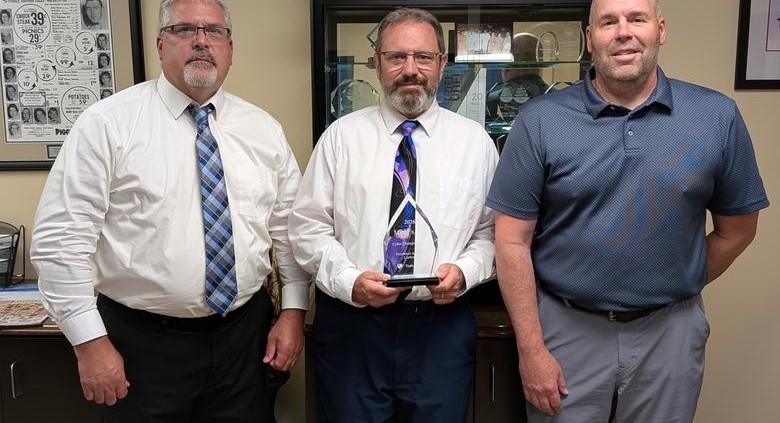
Pictured: Miner’s receiving the inaugural Truth in Cyber Cyber Champion Award.
Excellence in Security Leadership
At Truth in Cyber, we believe cybersecurity is not simply an IT responsibility. It is a leadership responsibility and a cultural commitment.
Every organization has security tools. Many complete compliance checklists. Some pass audits. But the organizations that consistently improve their security posture share something more important: leadership is engaged, employees understand their role, and security becomes part of how the business operates.
That is why we created the Truth in Cyber Cyber Champion Award.
The annual award recognizes organizations that demonstrate excellence in security leadership by building security into their culture rather than treating it as a checkbox or tooling exercise.
What Makes a Cyber Champion?
Executive Leadership & Accountability — Cybersecurity is actively prioritized at the executive level, with visible ownership of cyber risk. Leaders participate in governance and treat security as a business responsibility.
Continuous Improvement Mindset — Strong security programs are never finished. Cyber Champions are willing to identify gaps, act on guidance, and continually invest in improving their security maturity.
Security Culture & Employee Engagement — Security awareness is embedded into daily operations. Employees are educated, supported, and encouraged to understand the role they play in protecting the organization.
Operational Security Leadership — Internal leaders move security initiatives forward, collaborate across the business, and work with vendors and partners to improve security outcomes.
Transparency, Partnership & Engagement — Cyber Champions are willing to have honest conversations about risk, listen to outside perspectives, and focus on meaningful outcomes rather than appearances.
Why Miner’s Was Selected
Miner’s stood out across all five criteria.
Executive leadership consistently participates in the organization’s monthly cybersecurity steering committee. That level of engagement demonstrates real organizational ownership of security and keeps cyber risk visible beyond the IT department.
Tyree and Luke have shown strong operational leadership by driving security initiatives internally and working closely with vendors, partners, and advisors. Their work is supported by an organization that is willing to listen, learn, and act.
The team acts on guidance from its vCISO and completes annual security assessments and vendor risk assessments. Rather than treating an assessment as the finish line, they use the findings to help determine what comes next.
Miner’s also places a strong emphasis on its people. Employee cybersecurity education, security awareness training, and practical expectations such as clean-desk practices reinforce that security is part of everyday operations, not simply something happening behind the scenes in IT.
Recognition That Belongs to the Whole Organization
One of the most meaningful parts of this recognition came after the award was presented.
In sharing the news internally, the Miner’s IT team made a point of recognizing that every department played a role in earning the award. That message captures exactly what the Cyber Champion Award is intended to celebrate.
Cybersecurity is not built by one individual, one department, or one technology. It is built through consistent leadership, employees who understand why security matters, trusted partnerships, and an organization willing to keep improving.
Congratulations to everyone at Miner’s on becoming the inaugural recipient of the Truth in Cyber Cyber Champion Award.
We created this award to recognize organizations that are doing the work: taking ownership, building stronger security cultures, and making cybersecurity better through consistent action.
https://truthincyber.org/wp-content/uploads/2026/09/miners-cyber-champion-award.jpg1040780Melhttps://truthincyber.org/wp-content/uploads/2025/09/Truth-In-Cyber-logo-thin.pngMel2026-09-23 08:42:252026-09-24 09:29:30Celebrating Security Leadership: Miner’s Receives the Truth in Cyber Cyber Champion Award
We all know how important our computers are. They hold everything—work documents, emails, passwords, and personal data. They’re like a digital extension of who we are. But here’s the kicker: leaving your computer unlocked is like leaving your front door wide open. You wouldn’t do that, right?
Locking your screen when you walk away isn’t just a good idea—it’s essential. Let’s break down why this simple action matters more than you might think.
Your Data Deserves Protection
Imagine this: you step away for just a moment, and someone swoops in. They can read your emails, access confidential documents, or even hijack your accounts. For businesses, the risks are even greater—leaked client data or sensitive files can lead to fines, lost trust, or worse.
Locking your computer is like putting a digital lock on your front door. It’s the first line of defense.
Avoid Embarrassing or Malicious Misuse
An unlocked screen is a free pass for anyone to wreak havoc. They could send emails from your account, snoop through your files, or mess with your settings. Sometimes it’s harmless mischief—but sometimes, it’s not.
Picture this: a colleague jokingly sends an email to the whole team from your account. Funny? Maybe not when it lands on the CEO’s desk.
Insider Threats Are Real
We don’t like to think about it, but not every risk comes from outside hackers. Insider threats—whether intentional or accidental—are a big deal. An unlocked computer makes it all too easy for someone to grab files, install malware, or compromise your data.
Let’s not make it easy for them.
Social Engineering Attacks Thrive on Carelessness
Hackers don’t just exploit weak passwords—they exploit weak habits. An unlocked computer is an open invitation for someone to pretend they’re you. Once they’re in, they have everything they need to steal data or plant something malicious.
Think of it this way: locking your computer is part of shutting down that social engineering playbook.
Compliance Isn’t Optional
If you’re working in an industry with sensitive data, chances are you’re bound by regulations—HIPAA, GDPR, PCI DSS, you name it. Locking your screen isn’t just smart; it’s a requirement.
Breaking compliance rules because you forgot to hit Windows + L? That’s a tough conversation you don’t want to have.
How to Build the Habit
We get it—habits take time to form. But locking your computer is one of the easiest ways to protect yourself and your organization. Here’s how to make it second nature:
Master the Shortcuts:
On Windows, it’s Windows Key + L.
On Mac, hit Control + Command + Q.
Do it once, and you’ll see how fast it is.
Set It and Forget It:
Enable auto-lock on your device. Even if you forget, your computer won’t.
Visual Reminders:
Stick a Post-it note on your desk or monitor until it becomes automatic.
Team Accountability:
Make it part of your workplace culture. When everyone does it, it becomes the norm.
Upgrade Your Tools:
Use proximity-based locks or badge systems that automatically secure your computer when you walk away.
Lock It, Every Time
Here’s the bottom line: locking your computer is one of the simplest ways to protect yourself, your work, and your organization. It takes less than a second, but the impact is huge.
So next time you step away, don’t think twice—lock it. Because your data, your reputation, and your peace of mind are worth it.
Stay smart. Stay secure. Lock your screen. Every time.
https://truthincyber.org/wp-content/uploads/2025/04/Why-Locking-Your-Computer-is-Non-Negotiable.webp7901500ticbbosshttps://truthincyber.org/wp-content/uploads/2025/09/Truth-In-Cyber-logo-thin.pngticbboss2025-04-23 06:50:232025-04-23 07:00:27Why Locking Your Computer is Non-Negotiable
We may request cookies to be set on your device. We use cookies to let us know when you visit our websites, how you interact with us, to enrich your user experience, and to customize your relationship with our website.
Click on the different category headings to find out more. You can also change some of your preferences. Note that blocking some types of cookies may impact your experience on our websites and the services we are able to offer.
Essential Website Cookies
These cookies are strictly necessary to provide you with services available through our website and to use some of its features.
Because these cookies are strictly necessary to deliver the website, refusing them will have impact how our site functions. You always can block or delete cookies by changing your browser settings and force blocking all cookies on this website. But this will always prompt you to accept/refuse cookies when revisiting our site.
We fully respect if you want to refuse cookies but to avoid asking you again and again kindly allow us to store a cookie for that. You are free to opt out any time or opt in for other cookies to get a better experience. If you refuse cookies we will remove all set cookies in our domain.
We provide you with a list of stored cookies on your computer in our domain so you can check what we stored. Due to security reasons we are not able to show or modify cookies from other domains. You can check these in your browser security settings.
Other external services
We also use different external services like Google Webfonts, Google Maps, and external Video providers. Since these providers may collect personal data like your IP address we allow you to block them here. Please be aware that this might heavily reduce the functionality and appearance of our site. Changes will take effect once you reload the page.